







My first experience with video small-group curriculum was during the 40 Days of Purpose campaign. I picked up my small-group VHS tape and heard Rick Warren tell me, "If you can read, you can lead, and if you can push play on a VCR, you can be a star." I was amazed. It was so revolutionary to provide free video curriculum for small-group leaders—and it was so easy to use! I was hooked, and I immediately began asking, "How can I get my next fix?"
So that started me on the journey of creating video curriculum for my small-group leaders. My team and I have made plenty of mistakes along the way, but we've also made some great strides. Both our failures and successes have helped us continue to improve our methods. So, based on our experience, here is a step-by-step strategy to help you begin creating video curriculum for your small-group leaders.
Step 1: Locate a Videographer/Editor
While having a staff videographer is nice, it's not necessary to create video curriculum for your small-group leaders. Ask some of your leaders and volunteers if they know someone within your church who has a video-editing business or hobby. Outsourcing the video shoot and the editing will help you create a quality product.
Step 2: Choose Your Subject Matter
Your decisions about content will determine everything else, so choose if your subject matter will follow your weekend messages, will be a Bible study, or a topical study.
Step 3: Decide the Best Way to Communicate Your Ideas
The simplest approach to communicating your subject matter is to have a teacher from your church simply speak to a camera. With cue cards or a good memory, this can be done in just a couple of takes.
However, I would encourage you to ask if there's a better way to communicate the subject. Is there an image that makes a powerful statement? Could you interview someone whose story effectively makes your point? Are there props that can visually illustrate your topic? Can you communicate your idea with humor? Can actors tell the story best?
Answering these questions before you shoot will help you produce a higher quality and more memorable curriculum.
Step 4: Select Your Cast
Your first cast member is your teacher, but sometimes you might find it useful or necessary to expand your cast with actors or interviewees. The right teacher should always be one of the best teachers on your church staff. Never just settle for someone who is willing to teach on video. Instead, seek out the people with the desire and talent to effectively communicate your topic on camera.
Finding actors may be somewhat challenging. You can always find free actors from within your staff or congregation. If you are not convinced that these free actors will meet your expectations of excellence, you might consider developing a relationship with a local college theater professor. Students aspiring to act will often jump at the opportunity to practice their art. They might even help for free, but a small fee or honorarium would be helpful. So you may need to put a little extra money in your budget if actors are going to help make your point.
Still, there are people within your congregation who have great stories to tell. Ask around and find out who has a story that will enhance your video curriculum, and ask if they would like to be interviewed on camera. While you are asking questions during the interview, have them start their answers by saying your question in the form of a statement. For example if you asked a man when he realized he had an addiction to pain killers, he should start his answer by saying, "I realized that I was addicted to pain killers when … ." Also, looking straight into a camera lens without appearing uncomfortable is a skill that takes time to develop, so ease your interviewee's fears by asking them to not look directly at the camera.
Step 5: Write Your Material
The first part of your video curriculum material is the script. Writing a script does not have to be difficult. Expressing your subject matter in 400 words or less is certainly possible. You might simple provide the overall idea to the person doing the video teaching and ask him or her to write their own script.
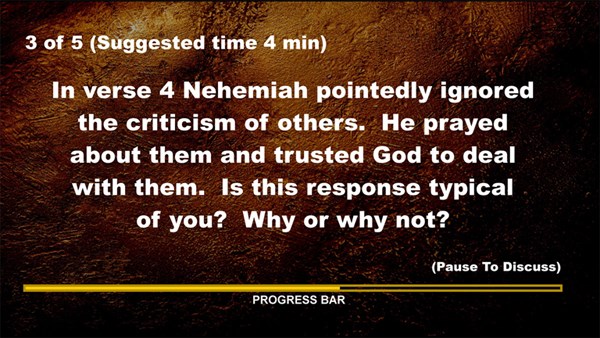
The second part of your video curriculum material is the discussion questions. There is plenty of material available about writing good questions, so I won't cover that here. Rather, I'll hit some of the creative ways that questions can be incorporated into the video itself. Rather than putting the questions in a booklet, you can save the printing costs by simply putting the questions on the video. Also, you should consider including on-screen instructions and tools to make the facilitation of the questions easier. It's important to make your final product as user-friendly as possible.
Here is an example that includes suggested time, a progress bar, and specific instructions:
Step 6: Piggy Back
Free video curriculum is enticing to leaders, so creating your own curriculum presents you with a great opportunity to tack on extra information that you want your groups to receive. You can insert any message you desire right into every group using your curriculum.
Ask yourself what you would like to train your groups to accomplish. Decide if you need to cast vision to your groups about an upcoming campaign or event. Consider what announcements or marketing you can include on the video. You're already going to the trouble of making the curriculum, so you might as well take advantage of the leadership and communication opportunities that come with it.
Step 7: Duplicate Your Video
If you have a relatively small number of group leaders, you, a staff person, or a volunteer can duplicate all of the DVDs using a single DVD burner. However, if you have a larger number of groups and creating a regular video series for groups is in your long-term strategy, it would be worth your while to invest in a quality, high-speed duplicator or establish a relationship with a local CD/DVD duplicating agency who will give you a good price.
Step 8: Distribute the Video
Deciding your distribution method is as important as creating the curriculum. Your leaders can come to the lobby to pick videos up each week, or you can simply put the videos online and ask your groups to "stream" the videos. Alternatively, you can post your videos on iTunes and your leaders can subscribe to the podcast—this will save them the trouble of having to pick up the curriculum each week, and it also saves a great deal of money in duplication costs.
Whether you choose to use these steps or modify the approach, creating your own video curriculum is a great way to help set your group leaders up for success.
Alan Danielson is Executive Pastor of Small Groups at JourneyChurch.TV.
—Alan Danielson; copyright © 2009 by the author and Christianity Today.